Showing posts with label ipad. Show all posts

Sunday, November 2, 2014

Here’s Why Steve Jobs Didn’t Let His Kids Use iPads and Why You Shouldn’t Either

 If you fall within the Gen-Y era like us, chances are you’ve given a bunch of thought as to how you would raise your own children in this day and age (assuming you don’t have children already). Especially with technology, so much has changed since our childhoods in the 90s. Here’s one question: Would you introduce the technological wonder/heroin that is the iPod and iPad to your kids?

Steve Jobs wouldn’t, and for good reason too.

In a Sunday article, New York Times reporter Nick Bilton said he once assumingly asked Jobs, “So your kids must love the iPad?”


Jobs responded:

“They haven’t used it. We limit how much technology our kids use at home.”
Especially in Silicon Valley, there is actually a trend of tech execs and engineers who shield their kids from technology. They even send their kids to non-tech schools like the Waldorf School in Los Altos, where computers aren’t found anywhere because they only focus on hands-on learning.

There is a quote that was highlighted in The Times by Chris Anderson, CEO of 3D Robotics and a father of five. He explains what drives those who work in tech to keep it from their kids.

    “My kids accuse me and my wife of being fascists and overly concerned about tech, and they say that none of their friends have the same rules…  That’s because we have seen the dangers of technology firsthand. I’ve seen it in myself, I don’t want to see that happen to my kids.”

If our current addictions to our iPhones and other tech is any indication, we may be setting up our children for incomplete, handicapped lives devoid of imagination, creativity and wonder when we hook them onto technology at an early age. We were the last generation to play outside precisely because we didn’t have smartphones and laptops. We learned from movement, hands-on interaction, and we absorbed information through books and socialization with other humans as opposed to a Google search.

Learning in different ways has helped us become more well-rounded individuals — so, should we be more worried that we are robbing our children of the ability to Snapchat and play “Candy Crush” all day if we don’t hand them a smartphone, or should we more worried that we would be robbing them of a healthier, less dependent development if we do hand them a smartphone? I think Steve Jobs had it right in regard to his kids.

So the next time you think about how you will raise your kids, you may want to (highly) consider not giving them whatever fancy tech we’ll have while they are growing up. Play outside with them and surround them with nature; they might hate you, but they will absolutely thank you for it later, because I’m willing to bet that’s exactly how many of us feel about it now that we are older.


More: TheUnboundedSpirit
If you fall within the Gen-Y era like us, chances are you’ve given a bunch of thought as to how you would raise your own children in this day and age (assuming you don’t have children already). Especially with technology, so much has changed since our childhoods in the 90s. Here’s one question: Would you introduce the technological wonder/heroin that is the iPod and iPad to your kids? - See more at: http://theunboundedspirit.com/why-steve-jobs-didnt-let-his-kids-use-ipads/#sthash.ffely2ou.dpuf
Monday, October 27, 2014

How To Speed Up iOS 8 On Your iPhone Or iPad

So iPhone 6 and iPhone 6 Plus were launched with new and modern iOS 8, and oh how iPhone users were excited. New phone, new OS, the world was beautiful again! Well iOS 8 was launched for some pretty old devices as well, namely the iPhone 4s and the iPhone 5. Of course these users felt welcomed into the arms of Cupertino at the time, but once they were through with the upgrade, users, especially those with iPhone 4s or iPad 2, began questioning their judgment. Pretty much akin to how every new major release of iOS slowly eats away at, at least one generation of supported devices, the iPhone 4s and older-gen iPads have fallen right into that infamous generation of ‘too slow’ devices. If you have upgraded your older device to iOS 8 and are really feeling that slowing down of time, there are a couple of steps you can take to speed up your device. Read on after the jump for the details!


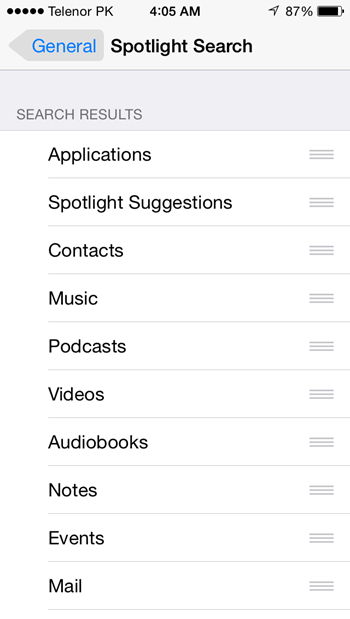
Turn Off Spotlight Search


Settings->General->Spotlight Search
Spotlight does a lot of background indexing of your files and other content system-wide. In iOS 8, it uses plenty of data sources from the internet too to get you your desired result, such as Wikipedia, News, Suggested Websites, App Store and more. All this can take up some major chunk of memory and storage on the older devices and it is recommended that you turn it off. If you really want to use this feature, just turn off the sources you do not want information from.
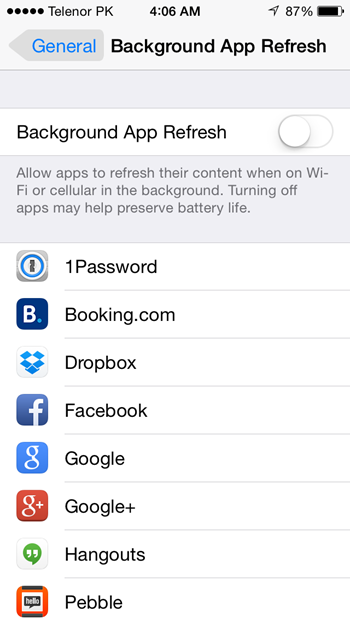
Turn Off Background App Refresh


Settings->General->Background App Refresh
Present in iOS 7 as well, it worked fine for older devices, but try turning this feature off in iOS 8, and you may feel a difference in the overall speed of you device. Apps refreshing their content automatically in the background takes it’s toll not only on the battery, but processing power as well. Essentially this is multitasking, and older devices will have trouble doing so in the face of an already heavy iOS 8.
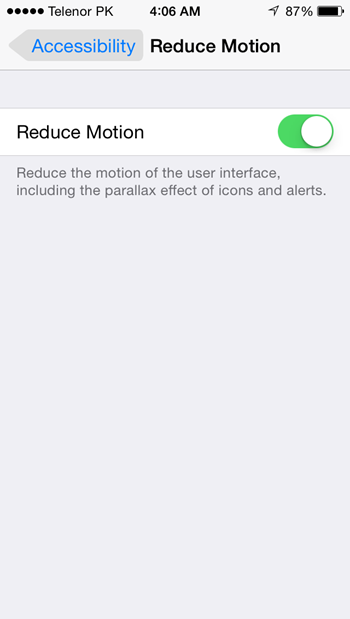
Turn On Reduce Motion


Settings->General->Accessibility->Reduce Motion
The moving wallpaper and the added system-wide animations are indeed beautiful, but now with iOS 8, it is taxing on your devices performance. You can disable the effect by turning on Reduce Motion in the Settings. You will have to trade off this effect for running iOS 8, so make your choice.
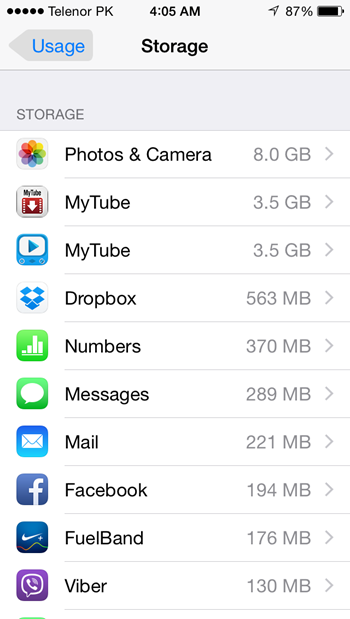
Clear Storage Space


Settings->General->Usage->Storage->Manage Storage
As if having to remove almost all your media files from your device wasn’t enough for that iOS 8 upgrade, if your device is low on storage, apps may crash or you may see some odd behavior or glitch here and there randomly. Make sure to keep a couple of GBs of storage available on your device free for smooth functioning.